vitunes
a curses media indexer and player for vi users

About

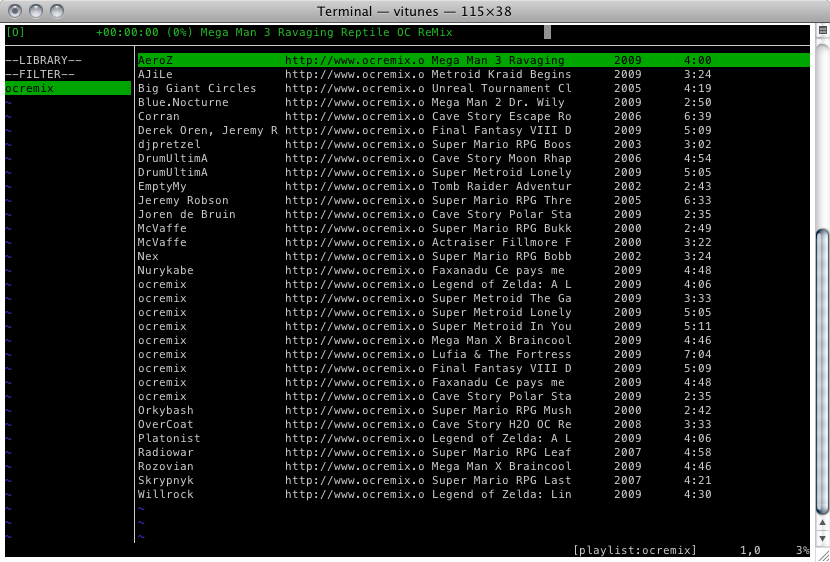
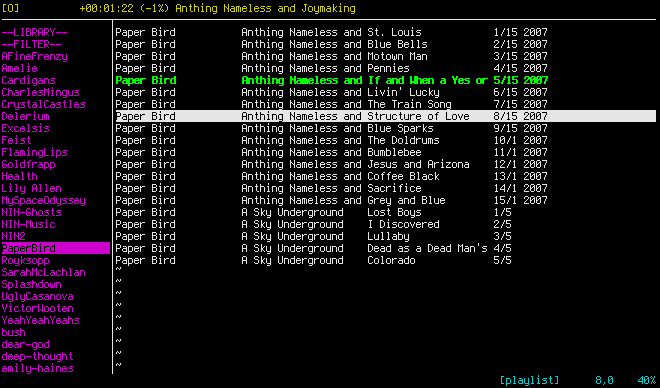
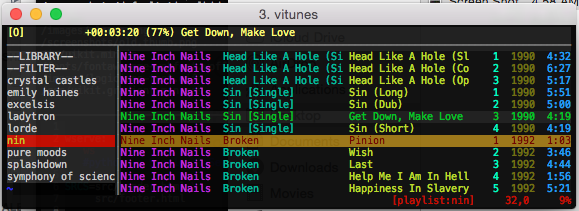
vitunes is a curses-based music player and playlist manager for *nix whose goals are: 1. a minimalistic appearance, 2. strong vi-like bindings, and 3. quick playlist creation/management. vitunes does not strive to be a full-blown media player, but rather a full-blown media indexer and playlist manager.

Additionally, vitunes never needs write-access to anything outside of its work directory (default is ~/.vitunes/). It never touches/modifies anything outside of there and doesn't leave junk files anywhere.

Features

vitunes...

  • never creates/modifies/removes any of your media files in any way.
  • never creates/modifies/removes any files outside of ~/.vitunes/.
  • uses mplayer to play all media, so it can index & play anything mplayer can.
  • can create, modify, search, filter, and sort playlists in a quick, vi-like fashion.
  • can extract meta-information (artist, album, title, etc.) automatically from many popular formats by using TagLib.
  • can index non-files (things like URL's)...pretty much anything mplayer can play.
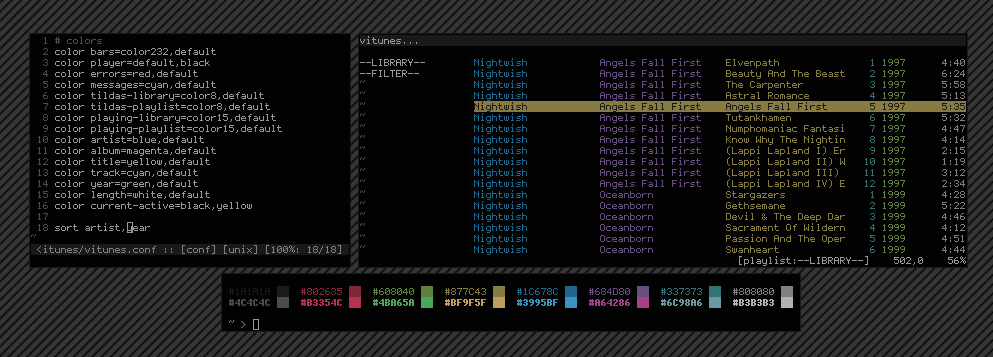
  • has an easily customizable display, including format & color

News

28 January 2010: FreeBSD Port!?
Catching up on freshports yesterday, I noticed that vitunes has been ported (for some time now!) to FreeBSD by Dennis Herrmann. Many thanks to him!
20 January 2010: 1.0.4 Released (Last one for a while)
Last release for a while, baring any bug fixes. A few bugs fixed, documentation updated, and I finally re-wrote the player code (only stuff untouched from previous rewrite). Can now search in the library window. Command abbreviations supported. Can right-align columns in display. See complete changelog here.
14 January 2010: 1.0.3 Released
Big news... I removed the dependency on libid3tag, libvorbis, and libmp4v2. Now TagLib is used for all meta-extraction. Much cleaner. Some bug fixes also. This does, however, bump the version & format of the database, thus all vitunes databases will have to be re-built. It's much faster now though. See the full changelog here.
12 January 2010: Upcoming Release
While browsing the intertubes today, I noticed that TagLib was updated recently and now includes MP4/AAC metadata including iTunes-style metadata. This is awesome, as TagLib is both way cleaner, faster, and overall better than the libraries I'm currently using. I'm updating vitunes now to use this new library. When finished, vitunes will also be able to tag files.
:D
9 January 2010: 1.0.2 Released
A small bug-fix release with a few new features. See the changelog here.
3 January 2010: 1.0.1 Released
A simple bug-fix release, fixing an issue where “reload db” would sometimes segfault due to a use-after-free.
30 December 2009: 1.0 Released!
After much work, including a nearly complete re-write of everything, the initial 1.0 release has been made! There are many new features. See a complete changelog here.

Documentation

Documentation is divided into the following 3 sections. Be sure to start with the Getting Started section first.

  1. Getting Started & Using vitunes
  2. e-Commands: Managing your Database
  3. Complete List of Keybindings

Getting Started & Using vitunes

The basics of using vitunes is discussed here. The primary source of documentation is the man page (vitunes(1)), which is divided into the following sections:

0. Getting Started
Start here for an overview of how vitunes works. Very short.
1. Command Line Options and E-Commands
An overview of how vitunes from the command line, including using e-commands to setup, manage, and maintain your database. See below for more details about the e-commands.
2. The Display
An overview of the vitunes display. Be sure to read this to understand the terminology used elsewhere.
3. Keybindings
A list of keybindings specific to vitunes; those shared with vi are omitted for brevity. A complete listing of all keybindings appears below.
4. Commands
A list of all command-mode commands in vitunes.
5. The Configuration File
A brief explanation of what may be in the configuration file.

E-Commands: Managing your Database

As mentioned in the Getting Started section, the database used by vitunes is managed through various “e-commands”. The following is a list of commands, with link to more information. Note that “vitunes -e help cmd-name”, may be used to obtain the exact same information.

vitunes -e init
Create the initial files used by vitunes, including an empty database.
vitunes -e update
Load the existing database and check all files indexed to see if any have been removed or if their meta-info has changed. The database is updated accordingly.
vitunes -e add
Scan the list of files/directories for files to add to the database.
vitunes -e addurl
Add a URL to the database, where you provide your own meta-information.
vitunes -e check
Check files to see what meta-information vitunes can extract, sanitize, and whether or not it's in the database.
vitunes -e rmfile
Remove a file/URL from the database.
vitunes -e tag
Add/modify the meta-information tags of raw-files.
vitunes -e flush
Load the database and dump its information in an easy-to-parse format to stdout.
vitunes -e help
Essentially this output.

Complete List of Keybindings

Once vitunes is launched, the following keybindings and commands are available. I start with the vitunes-specific keybindings, since the rest should be familiar to any vi[m] user. Recall that “^” means “CONTROL+”. The “n” that precedes most keybindings represents the optional “global input number” in vi. When not present, it defaults to 1.

NOTE: Be sure to pay special attention below to the yank/delete/paste semantics in the library window.

In the tables below, the scope field indicates how the keybinding behaves in the active window, which is always one of Library Window or Playlist Window. If the value is Global, it behaves the same in both.

Keybindings: vitunes-specific
these are subject to change, but easily configurable in config.h
key scope action
<ENTER> Library Window Load currently selected playlist for viewing & switch focus to playlist window
<ENTER> Playlist Window Begin playback of currently selected song
<TAB> Library Window Switch focus to playlist window
<TAB> Playlist Window Switch focus to library window
s Global stop playback
z Global pause/unpause playback
^p Global "    "    "    "
nb / nf Global Seek backwards/forwards n * 10 seconds in currently playing song
n[ / n] Global "    "    "    "
nB / nF Global Seek backwards/forwards n * 1 minute(s) in currently playing song
n{ / n} Global "    "    "    "
m Playlist Window Show/hide the filename & meta-info for the currently selected file.
Keybindings: Moving-Around & Misc.
key scope action
: Global Enter command mode. See below for list of commands.
^l Global Erase and redraw display
nj Global Move current row down n * 1 lines
n<KEY_DOWN> Global Move current row down n * 1 lines
nk Global Move current row up n * 1 lines
n<KEY_UP> Global Move current row up n * 1 lines
n- Global Move current row up n * 1 lines
nh Global Horizontally scroll left n * 1 columns
n<KEY_LEFT> Global Horizontally scroll left n * 1 columns
n<BACKSPACE> Global Horizontally scroll left n * 1 columns
nl Global Horizontally scroll right n * 1 columns
n<KEY_RIGHT> Global Horizontally scroll right n * 1 columns
n' ' Global Horizontally scroll right n * 1 columns
Note: that's a space.
$ Global Scroll all the way to the right
'^' Global Scroll all the way to the left
Note: that's a carrot, not a "CONTROL+"
0 Global Scroll all the way to the left
n^e Global Scroll screen down n * 1 line(s)
n^y Global Scroll screen up n * 1 line(s)
n^u Global Scroll screen up n * 1 half page(s)
n^d Global Scroll screen down n * 1 half page(s)
n^b Global Scroll screen up n * 1 full page(s)
n<PAGE_UP> Global Scroll screen up n * 1 full page(s)
n^f Global Scroll screen down n * 1 full page(s)
n<PAGE_DOWN> Global Scroll screen down n * 1 full page(s)
G Global Goto last row
nG Global Goto row n
n% Global Goto the row n% through the total number of rows
nH Global Goto the nth row from the top of current page
M Global Goto the middle row of the current page
nL Global Goto the nth row from the bottom of current page
Keybindings: Yank/Delete/Paste
key scope action
nyy Playlist Yank the next n rows into the copy buffer
yG Playlist Yank the rest of the current playlist into the copy buffer
*y* Library Currently can't yank at all in library window.
Note: I don't really see a way of doing this in an intuitive way, so it will probably never be added.
ndd Playlist Delete the next n rows and copy them into the copy buffer
dG Playlist Delete the rest of the files in the current playlist after copying them into the copy buffer
dd Library Delete the currently selected playlist
Note: Currently, no n can be applied to this in the library window. I simply do not want to be able to delete all of my playlists accidentally.
p Playlist Paste the contents of the copy buffer after the currently selected row.
P Playlist Paste the contents of the copy buffer before the currently selected row.
p Library Paste the contents of the copy buffer at the end the currently selected playlist.
P Library Paste the contents of the copy buffer at the beginning the currently selected playlist.
Keybindings: Searching
key scope action
/ Global Get query from user and search forwards in current window for first playlist/file that matches the query. The structure of the query specified is identical to that of the :filter command below. See that for more info.
Note: In the Library window, only the playlist name is matched against.
? Global Get query from user and search backwards in current window for first playlist/file that matches the query. The structure of the query specified is identical to that of the :filter command below. See that for more info.
Note: In the Library window, only the playlist name is matched against.
n Global Jump to the next row in the current window matching the last provided query. If the last query made was done using '/', then this search is forwards, otherwise it is backwards.
N Global Jump to the next row in the current window matching the last provided query. If the last query made was done using '/', then this search is backwards, otherwise it is forwards.

Screenshots

Obligatory... click each to embiggen.

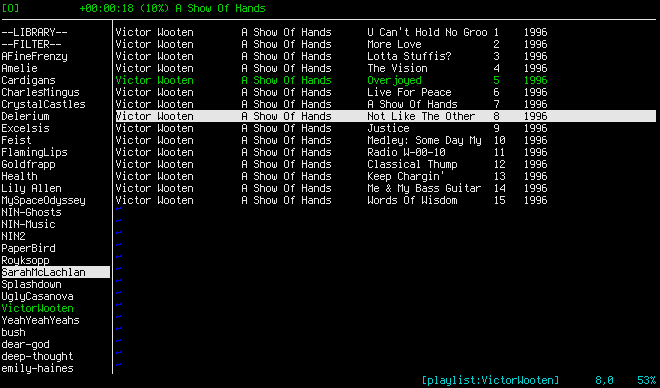
default look
default look
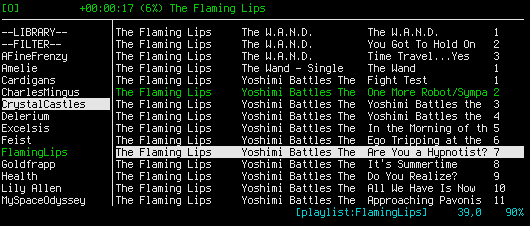
shrunken default
smaller version
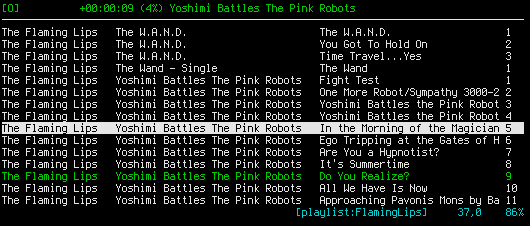
hidden library window
library window hidden
hideous colors
some hideous colors
older version
older version
smaller older version
tiny older version

Frequently Asked Questions

  1. I found a bug... what should I do?
  2. How do I change the meta-information of a file within vitunes?
  3. How do I backup the vitunes database?
  4. Can I have my database/playlists stored elsewhere?
  5. The cursor is always visible, even when I'm not in command mode... what gives?
  6. Scrolling, redrawing, and resizing are all very slow. Is this normal?
  7. For some songs, the percent-complete in the player window is always negative?
  8. I have an old version of vitunes with an existing database. When I run the new version, it tells me to rebuild my database. How do I do this?
  9. Adding regular files to the database is easy, but adding URL's is somewhat painful. Is there an easy way to automate this?
  10. When exiting vitunes, it seems to hang for one half-second. Why?
  11. What license is vitunes distributed under?
I found a bug... what should I do?
Email me, and include an extremely detailed description of your bug and how to reproduce it.
How do I change the meta-information of a file within vitunes?
Use the tag e-command (or another application) followed by an update.
How do I backup the vitunes database?
Just copy the ~/.vitunes/ directory. If you have your database/playlists stored elsewhere, just backup those.
Can I have my database/playlists stored elsewhere?
Yes. Use the -d and -p flags as described here.
The cursor is always visible, even when I'm not in command mode... what gives?
This is most likely a mis-configured $TERM environment variable. Specifically, it's set to something that does not support this particular feature. See the documentation for your OS & terminal emulator (e.g. xterm/rxvt/etc.) for what this should be set to. Note that “xterm-color” almost always has limitations. See the note here for more information.
On OpenBSD, your $TERM variable, when using xterm, should always be set to xterm-xfree86. Period.
Scrolling, redrawing, and resizing are all very slow. Is this normal?
If you're using an actual VT100 (or similar) or if you have 1,000,000+ songs in your library, then yes. Otherwise, no. This is mostly likely a misconfigured $TERM environment variable. See the previous F.A.Q. entry.
For some songs, the percent-complete in the player window is always negative?
When vitunes extracts the meta-information from songs, including playlength, it uses TagLib. If TagLib isn't able to determine determine the play length of the file, vitunes will attempt to determine the length when loading the file, but this isn't always possible either. In these cases, the percent will be negative.

Note: on OpenBSD, the current port of mplayer has problems with ogg files frequently, and the result is often a negative percent/play-time for those files.
I have an old version of vitunes with an existing database. When I run the new version, it tells me to rebuild my database. How do I do this?
I had to slightly change the format of the database for this new version. Also, I never included any “version” information in the previous format. This has now been changed. To upgrade an existing setup, download the most recent version below and 1) remove the existing database, 2) re-init the database, then 3) re-add all of your files. e.g.
         $ rm ~/.vitunes/vitunes.db
         $ vitunes -e init
         $ vitunes -e add /path/to/music/ ...
Adding regular files to the database is easy, but adding URL's is somewhat painful. Is there an easy way to automate this?
Of course! You're using *nix, so use a shell script to add all of your URL's, like this one: add_urls.sh.
When exiting vitunes, it seems to hang for one half-second. Why?
This is intentional. The fork()'d mplayer child will fork() an instance of itself whenever it plays an internet radio stream (or similar) to handle the buffering. As such, vitunes needs to wait for this ‘grandchild’ instance of mplayer to exit before quitting.
What license is vitunes distributed under?
ISC.

Download

For versions 1.0.3 and later, the only build dependency is TagLib. For versions prior to 1.0.3, the following libraries are required: libid3tag, libvorbis, and libmp4v2.

Additionally, you will need mplayer for vitunes to be able to play any of the files it indexes.

The current version of vitunes can be downloaded here: vitunes-1.0.4.tgz.
Updated: 20 January 2010.
Previous versions can be found here: files/.

IMPORTANT NOTE: vitunes is developed on OpenBSD. No effort has been made by me at porting to other OS's. As such there are probably numerous OpenBSD-isms. If you happen port this to another OS, I would be happy to post/link-to the patch/package.

Roadmap (Future Work)

Long term goals (i.e. not for a while!):

  • Add undo/re-do abilities
  • Support for :map & :command
  • ASCII-art audio visualization.... f' yeah!

If you like vitunes...

You may also enjoy these fine projects...

  • vimprobable - a minimalistic browser using webkit with strong vi-like usage.
  • surf - another browser like vimprobable, based on webkit and with a srong vi-like usage. from the great devs of suckless.org.
  • vimperator - firefox plugin that make it more vi-like. the first attempt to bring vi to a graphical web browser, and inspiration for vimprobable/surf.
  • cmus - another curses based music player similar to vitunes.
  • practical music search - a curses front-end for mpd.